schedule · 1 min read · Updated
How to Push docker image to Github Container Registry?
Part of series
Docker Tips
To access GitHub container registry you need to create Personal Access Token (PAT) on GitHub:
- Go to “Personal Access Token” settings page -> https://github.com/settings/tokens
- Click “Generate new token”
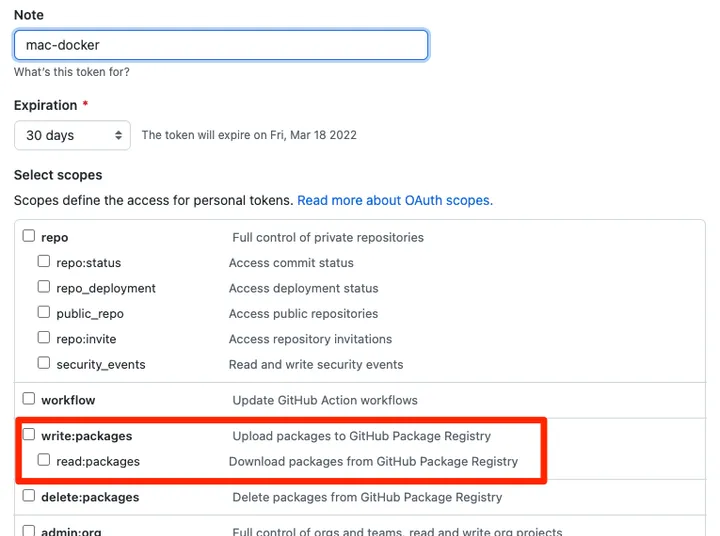
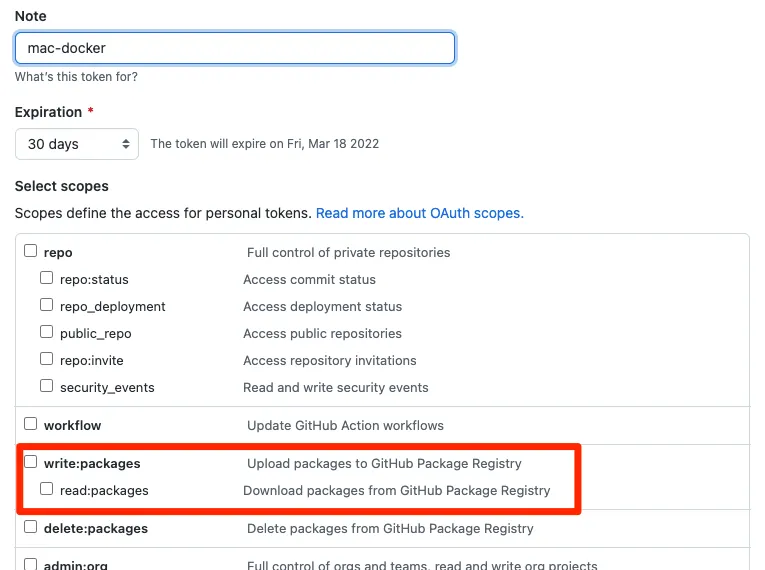
- Choose appropriate token expiration duration.
- Choose read, write
packagespermission, Since we want to push(write) and pull(read) docker images. - Click “Generate token” and copy the token
Login into Github Container Registry
Login into Github Container Registry with your username and the personal access token we got in the previous step.
docker login ghcr.io -u GITHUB_USERNAMEBuild Docker image and Tag the image
# cd into you dockerized project
docker build -t IMAGE_NAME:VERSION  .

# re-tag the image with ghcr path
docker tag IMAGE_NAME:VERSION ghcr.io/GITHUB_USERNAME_OR_ORG_NAME/IMAGE_NAME:VERSION
Push to Github Container Registry
docker push ghcr.io/GITHUB_USERNAME_OR_ORG_NAME/IMAGE_NAME:VERSIONPart of series
Docker Tips